Workflow Digitization Platform
Building a Platform to Track Projects, Archive Documents, and Automate Delivery Workflows.
Introduction
During my internship at Axians (a Vinci Energies subsidiary), I worked on an internal platform designed to support project managers in their daily operational work.
At Axians, when a contract is signed with a client, the project becomes what the company refers to as an affaire. The essential project information is created in SAP, which serves as the official starting point. However, in practice, SAP does not provide all the features needed to track projects efficiently, organize files, and handle the operational workflow around maintenance and infrastructure projects.
To address this, I helped build a web platform that complements SAP by giving project managers and assistants a clearer dashboard, better project tracking, centralized document storage, and tools to automate recurring tasks.
Business Context: What Is an "Affaire"?
In Axians' internal workflow, every signed client project becomes an affaire.
An affaire can represent different types of work:
- A maintenance project: where interventions happen on a recurring basis
- A realisation / infrastructure project: such as installing switches, routers, or other network equipment
SAP stores the core administrative information about these projects, but project managers still need additional tools to manage the operational side of the work more effectively.
The Problem: Why SAP Alone Was Not Enough
While SAP handled the initial creation of projects, it lacked several practical features needed for day-to-day follow-up. Project managers needed an easier way to:
- View clients and projects in a more operational dashboard
- Track project-related files in one place
- Archive documents such as bons d'intervention and bons de livraison
- Automate recurring intervention documents for maintenance contracts
- Generate delivery notes more efficiently using existing client and project data
In short, SAP stored the project, but it did not fully support the workflow around managing and documenting it.
The Solution: A Platform Built Around Project Operations
The application was designed as an internal operations platform that sits alongside SAP.
Its role is to extend it by giving project managers and assistants the tools they need after a project has been created. The platform acts as:
- A dashboard for clients and projects
- A document archive for intervention and delivery files
- An automation tool for recurring maintenance documents
- A productivity tool for generating delivery notes from material spreadsheets
This made the workflow more centralized, faster, and easier to manage.
Core Features
Client and Project Dashboard
The platform provides structured, filtred and paginated tables and views for clients and projects, making it easier to browse clients and projects as well as documents for a quick access.
File Storage and Archiving
Project-related documents such as bons d'intervention, bons de livraison, and other operational files — can be stored and archived in a centralized location. This improves traceability and eliminates the document fragmentation that came with managing files across email, local drives, and printed copies.
Automatic Generation of Intervention Documents
For maintenance projects, the application can automatically generate bons d'intervention when a project is created. This generation is based on business parameters such as:
- Maintenance frequency — how often interventions are scheduled
- Maintenance start date — when the first intervention begins
This removes repetitive manual work and ensures that recurring interventions are planned consistently from the start.
Delivery Note Creation from Spreadsheets
One of the most useful features was the ability to generate bons de livraison from a material spreadsheet. Since the platform already holds client and project information, project managers and assistants can prepare delivery documents quickly and without re-entering the same data that already exists in the system.
How the Workflow Works
The workflow starts when the project is registered in SAP. Once the affaire exists, the platform becomes the operational layer used by the project team.
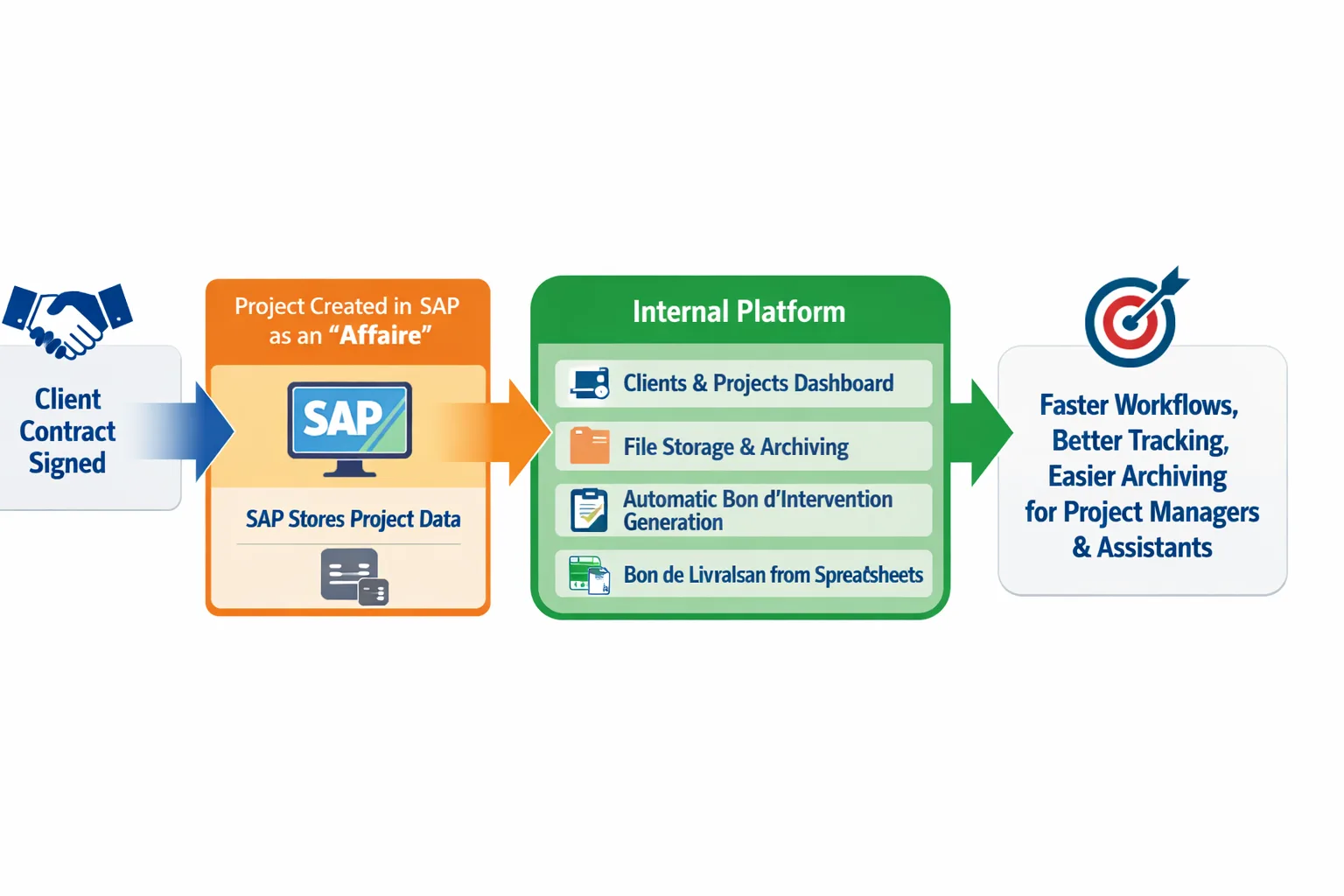
The platform does not duplicate SAP, it extends it at the point where SAP stops being practical for day-to-day work.
Tech Stack
- Backend — Laravel (PHP): REST API, business logic, PDF generation
- Frontend — React with shadcn/ui: clean, role-aware interface
- Database — PostgreSQL: relational structure maps naturally to clients, projects, and documents
- Auth — Laravel Sanctum: session management with role-based access
Non-Functional Benefits
Beyond the core features, the platform also delivered several non-functional benefits that improved the day-to-day workflow of the teams.
-
Better collaboration between project managers and assistants
By centralizing project information, archived files, and generated documents in one place, communication between project managers and assistants became smoother. Everyone could rely on the same source of truth instead of searching through scattered files or repeating the same manual steps.
-
Clear and approachable user experience
Using Shadcn UI helped create interfaces that are clean, structured, and easy to understand. This reduced friction for users and made the application more intuitive, especially for internal teams who needed to interact with the platform regularly.
-
Improved consistency in project follow-up
Standardizing how projects, intervention files, and delivery notes are handled made the workflow more consistent across different affaires. This helps reduce confusion and makes the operational process easier to follow.
-
Reduced manual effort and operational friction
By automating repetitive actions such as generating intervention documents and simplifying delivery note creation, the platform saved time and reduced the risk of human error in recurring administrative tasks.
Why I Chose This Stack
Choosing the right stack for this project was important because the application needed to provide a good user experience, secure server-side logic, and a backend capable of handling business workflows reliably.
Laravel
Laravel was a strong choice because it makes it easier to build secure and maintainable full-stack applications. Its starter kits provide a solid foundation with prebuilt authentication and dashboard structure, which helped accelerate development from the beginning.
Another reason Laravel fit this project well is that many of the required features were centered around CRUD operations. In this context, Laravel's Artisan scaffolding commands were very helpful for generating boilerplate code and speeding up implementation.
React and Shadcn UI
On the frontend, React made it easier to build reusable and dynamic interface components. Combined with Shadcn UI, it allowed me to create modern, clean, and understandable interfaces that improved the overall user experience of the platform.
Inertia.js
Inertia.js played an important role as the adapter between Laravel and React. It made the communication between both sides much easier to build, while keeping the application within a server-driven architecture.
Instead of building a completely separate API layer and handling everything manually on the client side, Inertia.js allows Laravel to stay in control of routing and data flow while React handles the interface. This approach simplified development, reduced complexity, and helped keep the application structure secure and cohesive.
What I Learned
The real work starts after the spec. The most valuable moments were sitting with project managers and watching how they actually used the system. Features that looked simple on paper had friction that only became visible in real use.
Business vocabulary matters. Understanding the difference between a maintenance affaire and a realisation affaire was not just context — it determined how documents were generated, what fields mattered, and how the UI needed to be structured.
Data modeling is the hardest part to change. The schema decisions made early — how projects relate to documents, how frequencies map to generated records — were the ones that had the longest-lasting impact. Getting those right upfront saved significant rework later.